
Who am I chatting with? AI disclosure in a website chat
A visitor should be able to tell who is answering before sharing a problem. Walk through the opening message, an AI answer and the handoff on a small screen.
Imagine opening a repair shop’s chat with one hand while holding a broken lamp in the other. The first line says “Alex here. How can I help?” Is Alex a technician who can book an appointment, or software that can explain the service policy? That difference affects what you ask and how much personal detail you share.
What Article 50 asks of a direct interaction
Article 50(1) of the EU AI Act requires providers to design AI systems intended to interact directly with people so that those people are informed they are interacting with AI. The text includes an exception where that is obvious to a reasonably well-informed, observant and circumspect person, taking the circumstances into account. Article 50(5) calls for clear, distinguishable information, at the latest at the first interaction or exposure, meeting applicable accessibility requirements. These obligations apply from 2 August 2026.
For a business choosing and configuring a widget, the practical question is what its visitor can actually see. A familiar brand colour or a sparkle icon alone gives a visitor little information about who is listening. A plain sentence can carry the meaning even if the visitor misses the icon. Identify who provides the system and who operates it when assessing your own obligations.
Legal text: Regulation (EU) 2024/1689, Article 50(1) and (5).
Write what the assistant can actually do
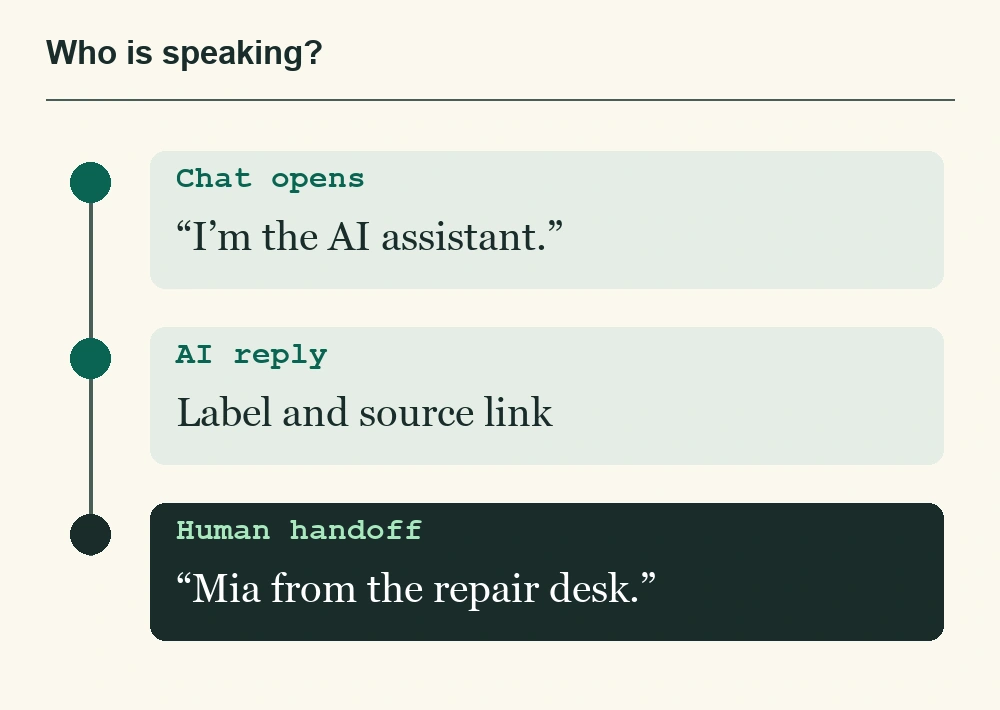
Try a first line like “You’re chatting with our AI assistant. I can help with information on this website. You can ask for a person.” In QuatroChat, AI replies are labelled as automatically generated. Open your own widget before typing and read the greeting in context. A label that appears with the answer and a greeting visible before a visitor shares anything serve different moments.
| Moment | What to check |
|---|---|
| Before the first message | Can I tell it is AI using text I can read at my usual zoom level? |
| When an answer appears | Is the speaker clear? Can I open the public source for a policy answer? |
| When a colleague joins | Can I see who took over? Does that person have the history I just provided? |
Read both sides of the handoff
Ask the assistant a question the site cannot settle, such as whether a technician can make an exception tomorrow. Request a person. A good first human message might read “Mia from the repair desk here. I can see you asked about tomorrow. Let me check.” If nobody is available, explain how the visitor can leave contact details. Promise a response time only when the team can honour it.
Repeat the exercise in each language you offer, with keyboard navigation and on a phone. If a message is only distinguishable by colour, have a colleague read it without looking at the bubble colour. This interaction check covers one part of a wider review. How you use conversation data, for instance, belongs in a separate privacy assessment.
Further reading: European Commission guidelines on the transparency obligations in Article 50.